Do you experience muffled audio during video calls or struggle with voice commands on your computer? The culprit may be your microphone. A computer microphone is a vital input device that captures sound and converts it into signals your computer can process. Without it, communication, recording, and voice-based tasks can become frustrating. This guide explores everything you need to know about computer microphones, from how they work to their types, features, and practical uses.
Read More: Mastering Dot Matrix Printers: Essential Types, Powerful Uses, and Insider Insights
What Is a Computer Microphone?
A computer microphone is an input device that captures sound and translates it into digital signals for your computer. This allows your device to process audio for recording, communication, or voice commands. Most modern computers come with built-in microphones, but external microphones can enhance audio quality significantly. Whether you are attending online meetings, recording podcasts, or using voice assistants, microphones play a crucial role in your digital interactions.
How Does a Microphone Work?
Microphones function by converting sound waves into electrical signals that the computer can interpret. Here’s a simple breakdown of the process:
- Sound Capture: You speak or make a sound near the microphone.
- Sound Wave Reception: The microphone picks up the sound waves.
- Signal Conversion: These sound waves are transformed into electrical signals.
- Transmission: Signals are sent to the computer for processing.
- Output or Recording: The computer uses the signals for recording, communication, or executing voice commands.
By converting sound into digital signals, microphones bridge the gap between human speech and computer processing.
Types of Microphones
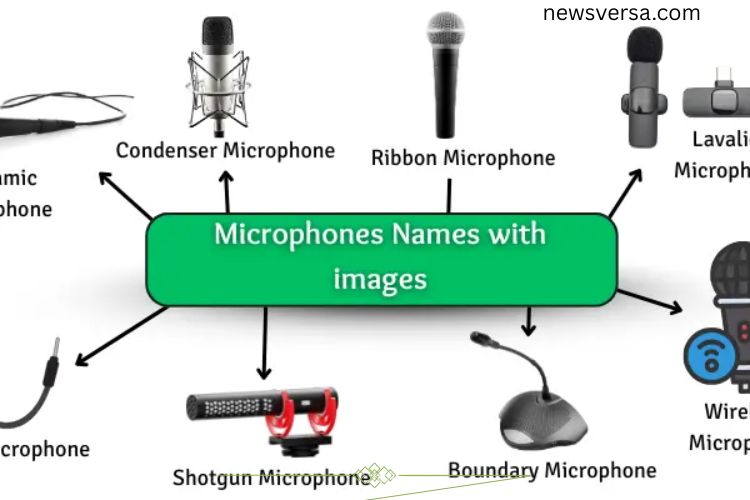
Microphones come in various types, each designed for specific tasks. Understanding their differences helps you choose the right one for your needs.
- Dynamic Microphone: Durable and simple, ideal for live performances.
- Condenser Microphone: Offers detailed and clear audio, commonly used in studios.
- Ribbon Microphone: Produces soft and warm sound, perfect for music recording.
- Lavalier Microphone: Compact and clip-on, ideal for interviews and videos.
- USB Microphone: Connects directly to a computer, beginner-friendly and easy to use.
- Wireless Microphone: Eliminates cables, convenient for presentations and stage use.
- Shotgun Microphone: Captures sound from one direction, widely used in video production and film.
Each type has unique benefits depending on the context, from professional recordings to casual online meetings.
Key Features of Computer Microphones
Modern microphones are designed to enhance audio quality and user experience. Here are essential features to consider:
- Noise Cancellation: Reduces background noise for clear audio.
- Built-in or External Options: Offers flexibility depending on your setup.
- Plug-and-Play Support: Simple setup without technical hassles.
- Voice Recognition: Enables voice commands for smart applications.
- High Sensitivity: Captures even soft sounds accurately.
- Adjustable Volume: Lets you control input levels easily.
- Software Compatibility: Works with communication apps, recording software, and streaming platforms.
- Digital Sound Processing: Improves clarity and reduces distortion.
- Lightweight and Compact Design: Convenient for portable use.
- Mute/Unmute Function: Quickly control audio input during calls or recordings.
These features make microphones versatile tools for both professional and personal use.
Common Uses of Microphones
Microphones are essential in many aspects of digital life. Their applications go far beyond simple voice recording:
- Voice Recording: Capture songs, speeches, podcasts, or storytelling sessions.
- Online Meetings: Ensure clear communication during video calls and webinars.
- Voice Commands: Control devices and software with your voice.
- Gaming and Streaming: Communicate seamlessly with teammates or audiences.
- Interviews: Record high-quality audio for media or research purposes.
- Live Events: Amplify voice or music for audiences in conferences or performances.
- Video Production: Add crisp, clear audio to YouTube, educational videos, or films.
- Online Learning: Support interactive learning in virtual classrooms.
From professional use to everyday tasks, microphones have become indispensable in the digital age.
Advantages and Disadvantages of Microphones
Like all devices, microphones come with their benefits and limitations.
Advantages
- Provide clear and accurate audio recording.
- Essential for online meetings, classes, and video calls.
- Enable voice control and command-based interactions.
- Enhance communication for podcasts, videos, and streaming.
- Useful for stage performances and live events.
Disadvantages
- May capture unwanted background noise.
- Some require additional setup or accessories.
- Certain types depend on batteries or external power.
- High-end models can be costly.
- Improper placement reduces sound quality.
By understanding these pros and cons, you can choose a microphone that suits your needs and environment.
Frequently Asked Questions:
What makes a computer microphone “magical”?
A computer microphone is considered “magical” because it transforms your voice into digital signals instantly, allowing clear communication, recording, and voice control on your device.
Can a microphone improve my video call quality?
Yes! A good-quality microphone reduces background noise and ensures your voice is crisp and clear, making online meetings and calls more professional.
Do all computers come with built-in microphones?
Most laptops have built-in microphones, but many desktops need an external microphone for high-quality audio. External mics often provide better clarity and noise cancellation.
What types of microphones work best for recording and streaming?
USB condenser microphones are popular for recording, streaming, and gaming. They deliver clear sound and are easy to set up with computers.
Can I use a computer microphone for voice commands and AI assistants?
Absolutely! Modern computer microphones support voice recognition, enabling seamless interaction with virtual assistants, dictation software, and smart applications.
How can I improve my microphone’s performance?
Position the microphone correctly, use noise-canceling features, keep it clean, and choose the right type for your environment to get the best sound quality.
Are wireless microphones reliable for online communication?
Wireless microphones are convenient and offer flexibility, but factors like battery life, range, and signal interference can affect performance.
Conclusion
A computer microphone is more than just a device—it’s a gateway to clear communication, professional recordings, and effortless voice control. Whether you’re attending virtual meetings, streaming content, recording podcasts, or using voice commands, a high-quality microphone amplifies your voice and ensures every sound is captured accurately. From built-in laptop mics to advanced USB or condenser options, choosing the right microphone can transform how you interact with technology. By understanding its types, features, and uses, you can maximize your audio experience, enhance connectivity, and make every conversation, recording, and presentation sound flawless.