Have you ever wondered how your computer produces music, alerts, or sound effects? The magic behind it is the computer speaker. Despite being an essential part of modern computers, many people don’t fully understand what speakers are, how they work, or their different types. This guide will simplify everything and help beginners grasp the essentials of computer speakers.
Read More: Discover the Magic of a Computer Microphone: How It Amplifies Your Voice and Connectivity
What is a Speaker in a Computer?
A computer speaker is an output device that converts digital audio signals into audible sound. It allows you to hear music, voices, alerts, and other audio directly from your computer. Speakers can be built-in or external, and they connect via wires, USB ports, or wirelessly through Bluetooth. Without speakers, computers would be silent, making multimedia experiences incomplete.
How Does a Computer Speaker Work?
Understanding how a speaker works can make technology less intimidating. Here’s a simplified explanation:
- Sound Creation: The computer generates digital audio data, such as music, video sound, or alerts.
- Signal Processing: The sound card converts this digital signal into an analog audio signal.
- Transmission: The analog signal travels to the speaker.
- Amplification: The speaker uses electrical power to amplify the sound.
- Sound Production: The speaker’s cone vibrates, producing sound waves we can hear.
In short, a speaker acts as a bridge between your computer’s digital data and your ears.
Types of Computer Speakers
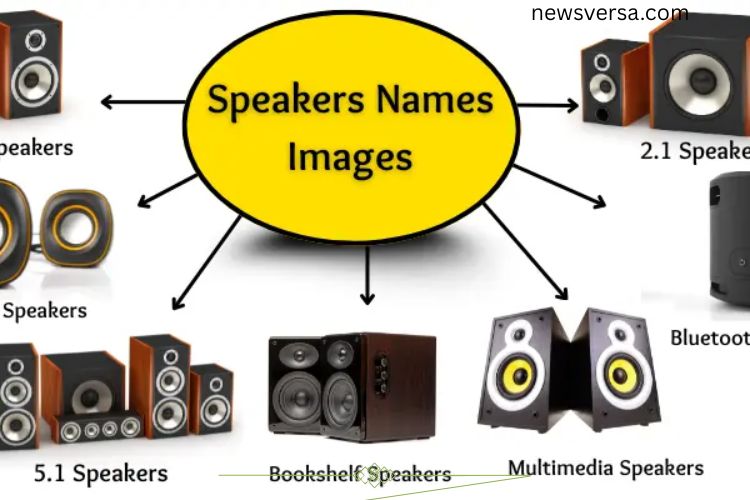
Computer speakers come in various shapes, sizes, and functions. Choosing the right type depends on your needs, whether for casual listening, gaming, or professional work. Here are the main types:
- 2.0 Speakers: Two simple speakers for basic audio output.
- 2.1 Speakers: Two speakers with a subwoofer for enhanced bass.
- 5.1 Speakers: Five speakers plus a subwoofer for immersive surround sound.
- Bluetooth Speakers: Wireless speakers that connect via Bluetooth.
- USB Speakers: Receive both power and audio through a USB connection.
- Portable Speakers: Compact and easy to carry for on-the-go use.
- Multimedia Speakers: Designed for gaming, movies, and music with rich sound.
- Bookshelf Speakers: Medium-sized speakers suitable for desktops or shelves.
- External Speakers: Separate from the computer, offering louder and clearer audio.
- Soundbars: Long, slim speakers providing quality sound while saving space.
- RGB Speakers: Speakers with colorful lights that sync with audio.
- Active Speakers: Include a built-in amplifier, eliminating the need for extra devices.
- Passive Speakers: Require an external amplifier to function properly.
These options ensure that every user can find a speaker type that matches their needs and preferences.
Uses of Computer Speakers
Speakers enhance almost every aspect of computer use. They are not just for entertainment—they play a practical role in daily tasks:
- Listening to Music: Enjoy songs with clear, rich sound.
- Watching Movies: Experience immersive audio for films and series.
- Playing Games: Hear every effect, explosion, and dialogue for realistic gameplay.
- Video Calls: Communicate with clarity during online meetings or personal calls.
- Online Classes: Follow lectures and tutorials without straining to hear.
- Alerts and Notifications: Receive important reminders and system alerts.
- Presentations: Amplify your voice for clearer communication.
- Tutorials and Learning: Understand educational videos more effectively.
- Voice Recording Playback: Listen to recordings for editing or review.
- Relaxation: Play soothing music for stress relief or meditation.
Speakers transform computers from simple machines into complete multimedia systems.
Key Parts of a Computer Speaker
A speaker may seem simple, but it contains multiple components that work together to produce quality sound:
- Cone: Moves back and forth to create sound waves.
- Magnet: Uses magnetic force to move the cone.
- Voice Coil: Conducts electric signals to move the cone.
- Dust Cap: Protects the center of the cone.
- Spider: Keeps the voice coil stable and ensures precise movement.
- Surround: Connects the cone to the speaker frame and allows free movement.
- Basket (Frame): Holds all components together.
- Terminal: The connection point for speaker wires.
Each part plays a vital role in delivering clear, accurate audio.
Advantages of Computer Speakers
Computer speakers offer many benefits, making them essential for modern computing:
- Ease of Use: Simple to connect and operate.
- Versatility: Suitable for music, videos, games, and calls.
- Accessibility: Available in wired or wireless options.
- Variety: Different sizes, designs, and types to match user needs.
- Enhanced Audio: External speakers provide superior sound compared to built-in options.
Disadvantages of Computer Speakers
While useful, speakers also have some limitations:
- Noise: Can disturb others in shared spaces.
- Power Needs: Some models require extra electricity or adapters.
- Cost: High-quality speakers can be expensive.
- Size: Larger speakers take up significant space.
- Connectivity Issues: Wireless models may occasionally disconnect.
Understanding both advantages and disadvantages helps users choose the right speaker setup.
Tips for Choosing the Right Speaker
When selecting computer speakers, consider the following:
- Purpose: Determine whether you need speakers for music, movies, gaming, or professional audio work.
- Space: Consider room size and available desk space.
- Connectivity: Decide between wired, USB, or Bluetooth options.
- Budget: Choose a speaker that balances cost and quality.
- Features: Look for added benefits like RGB lighting, built-in amplifiers, or surround sound.
Selecting the right speaker improves your computer experience and ensures the best sound performance.
Frequently Asked Questions:
What exactly are computer speakers?
Computer speakers are output devices that convert digital audio signals into sound. They let you hear music, movies, games, alerts, and voice calls from your computer.
How do computer speakers work?
The computer generates digital sound data, which is converted by the sound card into an analog signal. The speaker then amplifies this signal and produces sound waves that we can hear.
Can computer speakers improve gaming and movie experiences?
Absolutely! High-quality speakers, especially 5.1 or multimedia models, deliver immersive sound effects, making games more exciting and movies feel more realistic.
Are Bluetooth speakers as good as wired speakers?
Bluetooth speakers offer wireless convenience but may occasionally lose connection. Wired speakers often provide more consistent sound quality and lower latency.
How do I choose the right speaker for my computer?
Consider your needs: music, movies, gaming, or office use. Check connectivity (wired, USB, Bluetooth), speaker size, and budget. Features like surround sound, RGB lighting, or built-in amplifiers may also enhance your experience.
Can computer speakers be used for online classes and video calls?
Yes, they improve audio clarity, making it easier to hear instructors, classmates, or participants in virtual meetings.
Conclusion
Computer speakers are the gateway to a richer, more immersive computing experience. They transform digital data into sound, bringing music, movies, games, and communication to life. Whether you choose built-in speakers, wired or wireless models, or advanced surround-sound systems, understanding how speakers work and selecting the right type ensures you enjoy crystal-clear audio and powerful sound. By exploring the types, parts, and uses of computer speakers, beginners can make informed decisions that enhance productivity, entertainment, and everyday digital experiences. Investing in quality speakers not only improves sound quality but also unlocks the true potential of your computer, turning ordinary tasks into an engaging auditory adventure.