Joysticks are more than just fun gadgets—they transform gaming and simulation into a truly immersive experience. From flying a plane in a simulator to controlling characters in video games, joysticks provide precision, control, and excitement. These versatile input devices come in many types, each designed for specific tasks. Let’s explore the most popular joystick types and their unique features.
Read More: The Powerful and Game-Changing Uses of Microphones in Our Daily Lives
Types of Joysticks
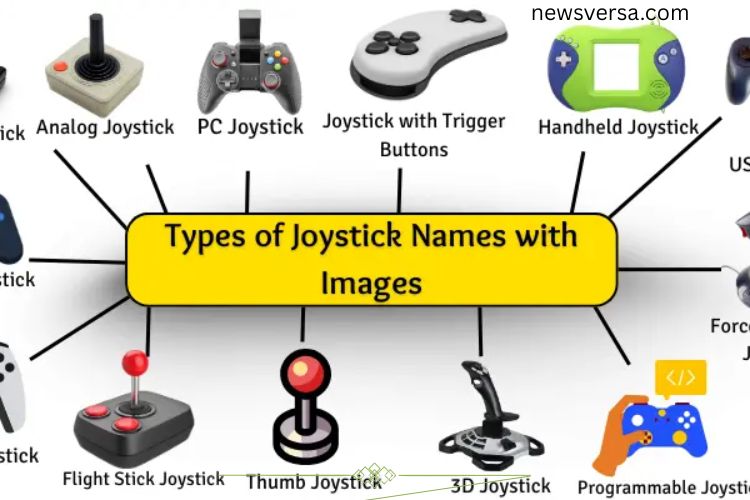
Joysticks vary widely depending on their purpose. They are used in gaming, flight simulations, robotics, and other digital interfaces. Each joystick type has its own mechanism and set of features, offering different levels of precision, comfort, and functionality.
Digital Joystick
Digital joysticks operate using simple directional buttons, typically allowing movement up, down, left, or right. When moved, the joystick sends signals for these fixed directions. This makes digital joysticks perfect for straightforward games and retro consoles. They are intuitive, easy to use, and widely recognized from classic gaming systems.
Analog Joystick
Analog joysticks provide smooth movement in all directions. Unlike digital joysticks, they detect subtle changes in motion, offering precise control over games or machines. This type is popular in flight simulators and modern video games, where accuracy and responsiveness are critical. Analog sticks allow players to tilt, push, or pull in any direction, translating motion into realistic in-game actions.
PC Joystick
A PC joystick is specifically designed for computer gaming. It enhances control over characters, vehicles, and other in-game actions. PC joysticks connect via wired or wireless methods, offering flexibility and comfort. They provide an intuitive interface for gamers who want a hands-on experience beyond traditional keyboards or mice.
USB Joystick
USB joysticks are plug-and-play devices that connect to computers using a USB port. They are simple, reliable, and compatible with many games. USB joysticks eliminate complicated setups, making them a favorite among casual and professional gamers alike.
Wireless Joystick
Wireless joysticks offer freedom of movement without the clutter of cables. They connect via Bluetooth or other wireless technologies, allowing players to operate devices from a distance. Ideal for gaming or controlling machines remotely, wireless joysticks deliver a clean setup and uninterrupted gameplay.
Gamepad Joystick
Gamepad joysticks combine buttons, triggers, and analog sticks in a single controller. Typically held with both hands, gamepads are compatible with gaming consoles and PCs. They enhance gameplay with ergonomic designs, multiple control options, and responsive input, making them one of the most versatile joystick types.
Flight Stick Joystick
Flight sticks mimic real airplane controls, providing a realistic flying experience. They allow movement in all directions and often include additional buttons for advanced functions. Popular in flight simulators, these joysticks immerse players in aviation games, letting them feel like true pilots.
3D Joystick
A 3D joystick moves in three dimensions, offering forward, backward, left, right, and push-pull motions. This functionality is useful in 3D spaces, such as flying simulations, robotics, and certain gaming applications. It provides greater control and precision when navigating complex environments.
Thumb Joystick
Thumb joysticks are compact and operated entirely with your thumb. Commonly found on game controllers, mobile devices, and handheld consoles, they offer convenient control without occupying much space. Their small size makes them ideal for portable gaming and mobile applications.
Force Feedback Joystick
Force feedback joysticks simulate real-world sensations by pushing back against the player’s movements. This feature adds realism, such as feeling crashes in racing games or turbulence in flight simulators. Force feedback joysticks enhance immersion and make gameplay more dynamic and interactive.
Handheld Joystick
Handheld joysticks are portable and designed for one-handed use. They usually feature a control stick and buttons for easy gaming on the go. Lightweight and user-friendly, handheld joysticks are especially popular with kids and casual gamers.
Programmable Joystick
Programmable joysticks allow users to customize buttons and controls for specific tasks. This flexibility benefits both gamers and professionals, improving efficiency and precision. By setting personalized configurations, users can perform complex actions quickly and comfortably.
Joystick with Trigger Button
Joysticks with trigger buttons include an extra button near the stick for fast actions. Commonly used in shooting or flight games, the trigger provides instant input for quick maneuvers. This design enhances gameplay speed and responsiveness, making it ideal for action-packed scenarios.
Frequently Asked Questions:
What are the main types of joysticks?
The main types include digital joysticks, analog joysticks, USB and wireless joysticks, gamepads, flight sticks, 3D joysticks, thumb joysticks, force feedback joysticks, handheld joysticks, programmable joysticks, and joysticks with trigger buttons. Each serves different gaming or control purposes.
Which joystick is best for gaming?
Analog joysticks and force feedback joysticks are ideal for gaming. Analog sticks provide smooth and precise control, while force feedback adds realistic tactile sensations for a more immersive experience.
Can I use a joystick on any computer or console?
Most USB and wireless joysticks are compatible with PCs, laptops, and gaming consoles. However, compatibility depends on drivers and system requirements, so it’s important to check before purchasing.
What is a force feedback joystick?
A force feedback joystick simulates real-world sensations by pushing back against your hand. It enhances immersion in racing, flight, and action games by replicating collisions, turbulence, or resistance.
How does a 3D joystick differ from a regular joystick?
A 3D joystick moves in three dimensions: left-right, forward-backward, and push-pull. This makes it ideal for 3D gaming environments, robotics, and simulation tasks that require precise spatial control.
Are programmable joysticks only for gamers?
No. Programmable joysticks are also used in professional applications like robotics, simulation, and industrial controls. Users can customize buttons and functions to enhance efficiency and control.
What is the benefit of a joystick with a trigger button?
Trigger buttons allow instant input for actions like shooting or special maneuvers in games. They make gameplay faster, more responsive, and more exciting, especially in action or flight simulations.
Conclusion
Joysticks are essential tools that elevate gaming, simulations, and digital control to a whole new level. From simple digital sticks to advanced force feedback and 3D joysticks, each type offers unique features designed for precision, comfort, and immersion. Understanding the differences between joystick types helps you choose the right one for your needs—whether it’s for casual gaming, flight simulation, robotics, or professional applications. By selecting the right joystick, you can enhance your gameplay, improve control, and truly master your digital experience.